
Built for the team behind every send.
Marketers, designers, copywriters, and the people who sign off, in one shared workspace. Every campaign, comment, and approval lives together, and the clients you review with never cost a seat.
14-day all-access trial. No credit card required.
- Roles & permissions
- Team-only comments
- Unlimited free guest reviewers
- Works with every ESP
How a team ships a campaign.
From a finished design to a signed-off send, everyone works from the same link and the same board.
- 1
Invite your team
Bring marketers, designers, and copywriters into one shared workspace.
- 2
Review together
Everyone pins feedback to the exact pixel, @mentions the right person, assigns the fix, and keeps internal notes team-only.
- 3
Route the sign-off
Send each campaign to the exact reviewers with a message and a deadline, then watch the whole pipeline move on one board.
One workspace. Everyone in it.
Invite your marketers, designers, and copywriters into one shared workspace where campaigns, tags, and comment labels are common ground. Keep everything organized with folders for each client, brand, or campaign, so the whole team always knows where to look.
- Shared campaigns, tags, and comment labels
- Folders for each client, brand, or campaign
- One organized home for the whole team




Mention a teammate. Assign the fix.
Every comment can @mention the person who needs to see it and be assigned to whoever owns the change. Statuses move from open to in progress to resolved, so a review reads like a worklist instead of a wall of notes.
- @mention teammates right in a comment
- Assign comments to the person who owns the fix
- Open / In progress / In review / Resolved states
Route sign-off to the right people.
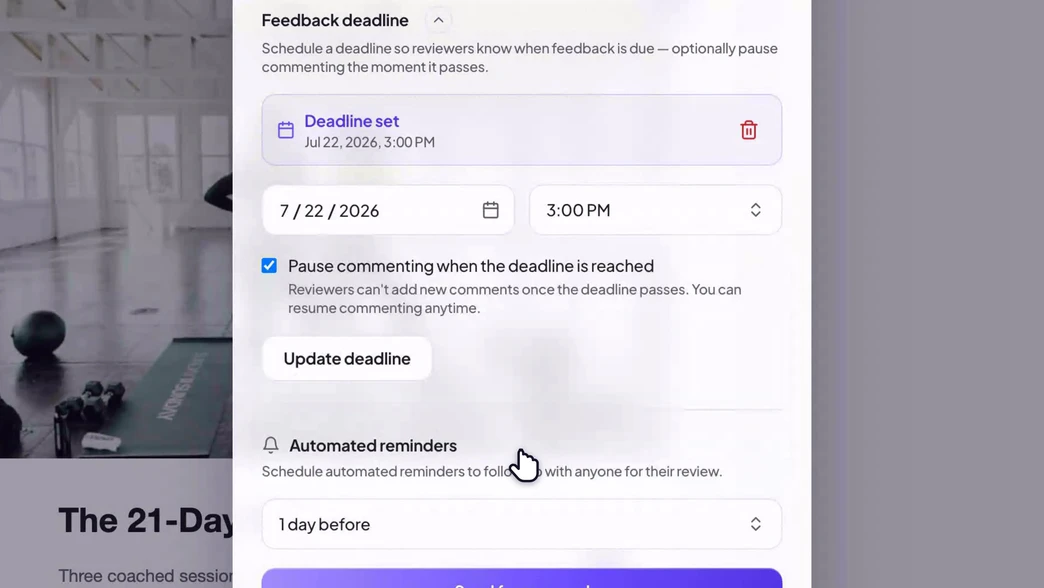
Send a campaign to the exact reviewers it needs, brand, legal, the client, with a message and a deadline. Require one approval or several. The status flips itself the moment everyone signs off, and the whole trail is kept.
- Multiple named approvers, each tracked
- A personal message, a deadline, and automated reminders
- Full audit trail of who approved what, when
Internal notes stay internal.
Team-only comments are visible to your workspace and no one else. Keep the candid back-and-forth on the same email you share with a client, and guests only ever see the feedback you mean for them. Nothing internal leaks.
- Team-only comments guests never see
- One email, two audiences, no leaks
- Private comments for personal reminders
Elena Marshjust now Team onlyHold the send until legal signs off on the disclaimer — don’t surface this to the client.
Every brand in its own lane.
Run in-house or across a roster of clients from one workspace. Group campaigns into folders per brand or client, share a whole folder with a single link, and slice the board by campaign, tag, status, or owner. Grid, list, and Kanban views, always in sync.
- Folders per brand or client, shared with one link
- Shared tags and labels the whole team can use
- Grid, list, and Kanban, filterable in a click
- included on every Team plan
- 3 seats
- guest reviewers, always free
- Unlimited
- on one shared pipeline board
- Every stage
Bring the whole review in-house
Tags, comment labels, and folders are shared across the team, so the way one person organizes a campaign is the way everyone finds it. Shared once, useful to everyone.
Five brands, three approvers each, one Kanban. I can finally see every campaign’s review state without opening a spreadsheet.

Questions, answered
- Do reviewers or clients need a paid seat?
- No. Seats are only for the people in your workspace who create and manage campaigns. The clients, stakeholders, and colleagues who review and approve are unlimited guests, always free. You only pay for the team doing the work, never for the people signing off.
- How many people can be on a team?
- The Team plan includes 3 seats and you can add as many more as you need at $10 per seat / month. Everyone on the team shares campaigns, tags, labels, and comment history.
- What can members do versus owners?
- Owners manage billing, membership, and workspace settings. Members create and review campaigns, comment, get @mentioned and assigned, and approve. Roles keep permissions sane without getting in the way.
- Are team comments visible to guests?
- No. Team-only comments stay internal to your workspace; guests on a share link only ever see the feedback you intend for them. Internal notes and client-facing notes live on the same email without leaking.
- Can different brands or clients stay separate?
- Yes. Group campaigns into folders per brand or client, share a whole folder with one link, and use shared tags to slice the Kanban by campaign, status, or owner. One workspace, every account in its own lane.
Get your team on the same page. Literally.
Start a 14-day all-access trial of the Team plan. Invite the whole crew, no credit card required.
14-day all-access trial · no credit card required · reviewers never need an account