
One link. Every sign-off. No accounts needed.
The client, the brand lead, and legal each open the same link, review the real email, and approve or say what needs to change. No logins to hand out, and every decision on the record.
14-day all-access trial. No credit card required.
- No account for approvers
- Unlimited guest reviewers
- Multi-approver sign-off
- Full audit trail
From “ready for review” to “approved,” in one link.
Nothing for your reviewers to install and nothing new to learn. Three steps from a finished email to a signed-off send.
- 1
Add the reviewers
Choose who needs to sign off: teammates, the client, legal. Add their emails or pick teammates, with an optional message and a deadline.
- 2
They open one link
Everyone gets the same link. Guests just type a name, no account, no app, no seat to buy, then review the real email, not a screenshot.
- 3
You get one answer, logged
Approved, or exactly what needs to change pinned to the email. Statuses update themselves and every decision lands in the audit trail.
The whole reviewer onboarding is typing a name.
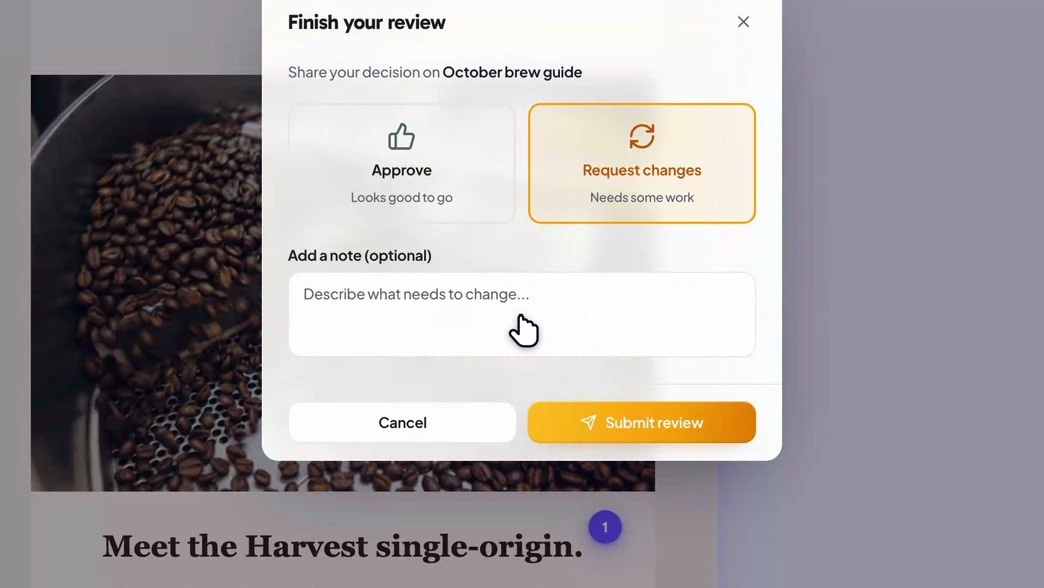
Send one link to a client, an exec, or legal. They enter a display name and get the full reviewing surface your team uses: comments, annotations, dark-mode preview, and one clear decision, Approve or Request changes. No invite emails to chase, no password reset for someone who signs in twice a year.
- Unlimited guest reviewers on every plan, free and paid
- Never buy a seat for a client or an approver
- Approve or request changes in one tap, no account
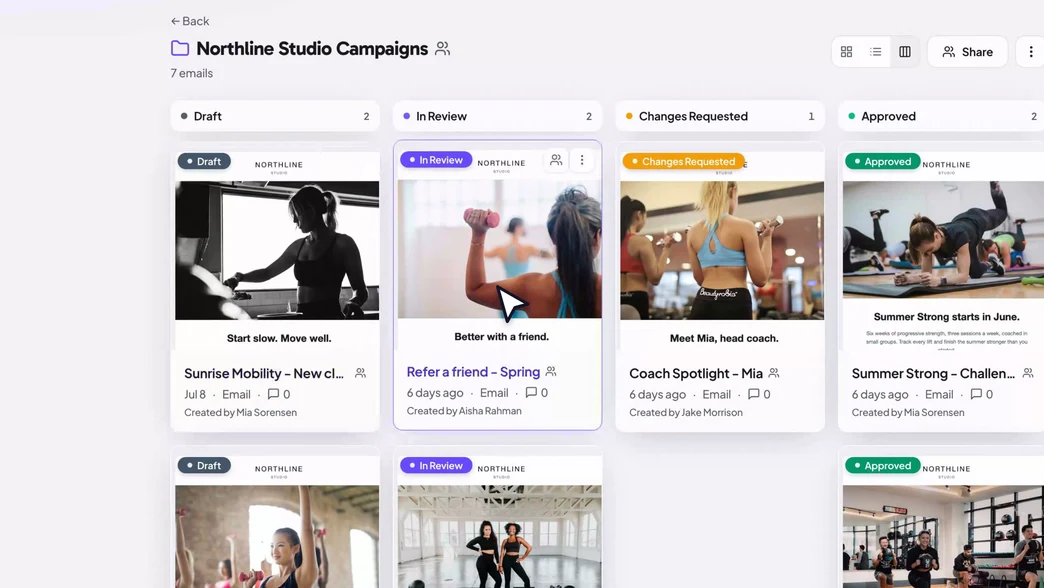
Multi-approver sign-off, one board to watch it land.
Add the reviewers a campaign actually needs, then watch the pipeline update itself: all approvals in flips it to Approved; any objection flips it to Changes Requested, with the reason pinned to the email. Draft, In Review, Changes Requested, Approved, your whole calendar at a glance.
- Require one approval or several before it can ship
- Kanban, grid, and list views of every campaign
- A full audit trail: who approved, when, and what they said
Built for the team behind the send.
Team workspaces share campaigns, tags, and comment labels. Roles keep permissions sane, team-only comments keep internal notes off the client link, and folders group everything by client or campaign, shareable as a single link.
- Team workspace with roles and permissions
- Team-only comments guests never see
- Share a whole campaign folder with one link
Safe to send to anyone outside the building.
For confidential campaigns, lock the link down and keep the paper trail. Nothing leaves your control, and every decision stays on the record.Pro
- Password-protect any review link
- Set links to expire in 7 days, 30 days, or never
- Feedback deadlines with reminders and optional auto-pause
- A full audit trail of every approval decision
- guest reviewers on every plan, including Free
- Unlimited
- to buy for a client, an approver, or legal
- No seat
- sign-off on Pro and Team; single approval on Free
- Multi-approver
One layer between “design done” and “approved to send.”
Proofel never sends your campaign, so it drops into whatever ESP you already use. Bring the email in, collect the sign-off, then send from your own tool.
Our legal reviewer will not create an account for anything. She opens the Proofel link, leaves her notes, hits approve. That alone sold it internally.

Questions, answered
- Do approvers need an account?
- No. An approval link works like a share link: the reviewer opens it, enters a name, reviews the real email, and approves or requests changes. There is no signup and no app, and their decision is recorded either way.
- Do I pay per approver?
- Never. Guest reviewers are unlimited on every plan, including Free. You add the client, the brand lead, and legal without buying a seat for any of them.
- Can I require more than one approval?
- Yes. Pro and Team support multi-approver sign-off: add several reviewers and require however many sign-offs the campaign needs before it flips to Approved. Everyone you add gets the same link at once, in no set order. Free covers single-approver sign-off.
- Is there a record of who approved what?
- Yes. Every campaign keeps an audit trail: who it was sent to, who approved or requested changes, when, and the reason they gave. It is there for compliance, and for the next person who asks whether legal signed off on this.
- What happens if a reviewer misses the deadline?
- On Pro and Team you can set a feedback deadline with automated reminders, and optionally pause commenting the moment it passes so late changes do not sneak in. You can resume commenting anytime.
- What if the campaign is confidential?
- Approval links can expire (7 days, 30 days, or never) and can be password-protected. Passwords are hashed server-side, so Proofel never stores or transmits them in plain text.
- Can I send a whole folder of campaigns for review?
- Yes. Share an entire campaign folder as one link and stakeholders can review every email inside it, with the same no-account flow.
Send the link. Collect the yes.
Add your reviewers, share one link, and watch every decision land in one place.
14-day all-access trial · no credit card required · reviewers never need an account